Appearance
source-control
Git flow
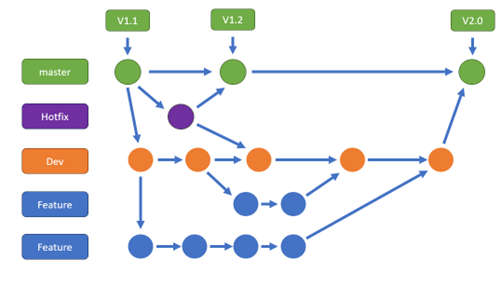
When more than 1 developer works on a project, the recommended way to work is with GIT flow. Git flow has default branch called Master which is always contains the same version as the production. When a hot fix is needed the developer will create one from the master branch. In the end of the developing it will be merge back into the Master. Another branch will be the Dev which will contain the dev lifecycle. From the dev branch every Developer will create feature branch.
Gif flow example
Non Git flow
When working with branches creates too much overhead for the dev team the developers needs to pull and push as soon as possible. The recommendation is at the end and beginning of every work day. You should keep in mind that only valid code (compiled and organized) should be pushed. if possible, the code should be working from the aspect of business logic too.
Task oriented commits
It is best practice to divide the commits foreach task. To do that, all files related to the specific task should be staged and be commited together apart from other files. Thereafter another stage for the other task files and repeat. After all the files has has been committed, the system is ready for pull and push.